#13 ️ Fine-Tuning LLMs for Precision: Unlocking the Full Potential of AI
Imagine you’ve trained a chef who can cook any dish. But if you need them to perfect a regional specialty or add a unique twist, you’ll give them more specific training.
Imagine you’ve trained a chef who can cook any dish. But if you need them to perfect a regional specialty or add a unique twist, you’ll give them more specific training. That’s what fine-tuning does for Large Language Models (LLMs). Instead of training the model from scratch, fine-tuning helps it excel in specific areas by honing its responses to better align with the needs of your application. In this chapter, we’ll explore how fine-tuning works, when to use it, and various techniques — including Parameter-Efficient Fine-Tuning (PEFT) — to get the best results.
1. Why Fine-Tune LLMs? 🎯
Fine-tuning adds precision and relevance to LLMs by making them more adaptable to particular contexts or industries. Here are some situations where fine-tuning is valuable:
-
Domain Specialization: Tailoring a general-purpose model to work in specialized fields, like healthcare or finance.
-
Improved Accuracy: Reducing errors by teaching the model the nuances of your content, which may not be covered well in general data.
-
Enhanced Tone and Style: Making responses feel more natural, professional, or on-brand for specific use cases.
2. Fine-Tuning Techniques and Approaches 🔧
There are different approaches to fine-tuning, each suitable for various needs and levels of complexity. Here’s a breakdown of the most popular techniques:
2.1 Full Fine-Tuning 🏋️
In full fine-tuning, the entire model is trained on the new data. This approach is powerful but requires substantial computational resources, as it updates all model parameters.
Example Code: Full Fine-Tuning on Custom Data
import transformers
from transformers import AutoModelForCausalLM, Trainer, TrainingArguments, AutoTokenizer
from datasets import Dataset
# Load the model and tokenizer
model_name = "gpt2" # Using GPT-2 as an example
model = AutoModelForCausalLM.from_pretrained(model_name)
tokenizer = AutoTokenizer.from_pretrained(model_name)
# Define your dataset
train_texts = ["Custom sentence 1.", "Custom sentence 2."]
train_encodings = tokenizer(train_texts, truncation=True, padding=True)
train_dataset = Dataset.from_dict({
    "input_ids": train_encodings["input_ids"],
    "attention_mask": train_encodings["attention_mask"]
})
# Set up training arguments
training_args = TrainingArguments(
    output_dir="./results",
    per_device_train_batch_size=2,
    num_train_epochs=3,
)
# Fine-tune the model
trainer = Trainer(
    model=model,
    args=training_args,
    train_dataset=train_dataset,
)
trainer.train()Explanation: In this example, we use the Hugging Face Transformers library to fine-tune the entire model on a small custom dataset. This is best for high-impact applications where full control over the model is needed.
Pros and Cons:
- Pros: High accuracy, complete model control.
- Cons: Expensive and computationally demanding; requires large datasets.
2.2 Parameter-Efficient Fine-Tuning (PEFT) 🧩
Parameter-Efficient Fine-Tuning (PEFT) techniques aim to adapt large models to new tasks without updating all their parameters. This approach significantly reduces computational requirements and storage costs by training only a small subset of the model’s parameters. PEFT methods are especially useful when dealing with very large models that are impractical to fine-tune entirely.
PEFT includes several techniques:
-
LoRA (Low-Rank Adaptation)
-
Prefix Tuning
-
Adapters
-
Prompt Tuning
2.2.1 LoRA (Low-Rank Adaptation)
LoRA introduces trainable rank decomposition matrices into each layer of the Transformer architecture. This allows for quick adaptation with minimal additional parameters.
Example Code: Fine-Tuning with LoRA
from transformers import AutoModelForCausalLM, Trainer, TrainingArguments, AutoTokenizer
from peft import get_peft_model, LoraConfig, TaskType
from datasets import Dataset
# Load the base model and tokenizer
model_name = "gpt2"
model = AutoModelForCausalLM.from_pretrained(model_name)
tokenizer = AutoTokenizer.from_pretrained(model_name)
# Prepare your dataset
train_texts = ["Custom sentence 1.", "Custom sentence 2."]
train_encodings = tokenizer(train_texts, truncation=True, padding=True, return_tensors="pt")
train_dataset = Dataset.from_dict({
    "input_ids": train_encodings["input_ids"],
    "attention_mask": train_encodings["attention_mask"]
})
# Configure LoRA
lora_config = LoraConfig(
    task_type=TaskType.CAUSAL_LM,
    r=8,
    lora_alpha=32,
    lora_dropout=0.1,
)
# Apply LoRA to the model
model = get_peft_model(model, lora_config)
# Define training parameters
training_args = TrainingArguments(
    output_dir="./results",
    num_train_epochs=1,
    per_device_train_batch_size=1,
)
# Fine-tune with Trainer
trainer = Trainer(
    model=model,
    args=training_args,
    train_dataset=train_dataset,
)
trainer.train()Explanation: This example shows how to apply LoRA to a GPT-based model using the peft library. LoRA modifies only specific parts of the model, reducing the need for resources while maintaining adaptation effectiveness.
Pros and Cons:
- Pros: Lower computational requirements, retains base model integrity.
- Cons: May not achieve full accuracy compared to full fine-tuning.
2.2.2 Prefix Tuning 📜
Prefix Tuning keeps the original model weights unchanged and learns task-specific continuous vectors (prefixes) to steer the model’s behavior.
Example Code: Prefix Tuning Setup
from transformers import AutoModelForCausalLM, AutoTokenizer, Trainer, TrainingArguments
from peft import get_peft_model, PrefixTuningConfig, TaskType
from datasets import Dataset
# Load the base model and tokenizer
model_name = "gpt2"
model = AutoModelForCausalLM.from_pretrained(model_name)
tokenizer = AutoTokenizer.from_pretrained(model_name)
# Prepare your dataset
train_texts = ["Custom sentence 1.", "Custom sentence 2."]
train_encodings = tokenizer(train_texts, truncation=True, padding=True, return_tensors="pt")
train_dataset = Dataset.from_dict({
    "input_ids": train_encodings["input_ids"],
    "attention_mask": train_encodings["attention_mask"]
})
# Configure Prefix Tuning
prefix_config = PrefixTuningConfig(
    task_type=TaskType.CAUSAL_LM,
    num_virtual_tokens=20,
)
# Apply Prefix Tuning to the model
model = get_peft_model(model, prefix_config)
# Define training parameters
training_args = TrainingArguments(
    output_dir="./results",
    num_train_epochs=1,
    per_device_train_batch_size=1,
)
# Fine-tune with Trainer
trainer = Trainer(
    model=model,
    args=training_args,
    train_dataset=train_dataset,
)
trainer.train()Explanation: Here, we use the peft library to implement Prefix Tuning. We define a set of virtual tokens (the prefix) that influence the model’s output, effectively steering its behavior without changing its weights.
Pros and Cons:
- Pros: Lightweight, minimal changes to the model.
- Cons: Limited scope; best for modifying style and general behavior.
2.2.3 Adapters 🔌
Adapters are small bottleneck layers inserted between the layers of the pre-trained model. Only these adapter layers are trained during fine-tuning.
Example Code: Using Adapters
from transformers import AutoModelForCausalLM, AutoTokenizer, Trainer, TrainingArguments
from peft import get_peft_model, AdaLoraConfig, TaskType
from datasets import Dataset
# Load the base model and tokenizer
model_name = "gpt2"
model = AutoModelForCausalLM.from_pretrained(model_name)
tokenizer = AutoTokenizer.from_pretrained(model_name)
# Prepare your dataset
train_texts = ["Custom sentence 1.", "Custom sentence 2."]
train_encodings = tokenizer(train_texts, truncation=True, padding=True, return_tensors="pt")
train_dataset = Dataset.from_dict({
    "input_ids": train_encodings["input_ids"],
    "attention_mask": train_encodings["attention_mask"]
})
# Configure Adapters
adapter_config = AdaLoraConfig(
    task_type=TaskType.CAUSAL_LM,
    target_r=8,
    init_r=12,
    beta1=0.85,
    beta2=0.85,
    tinit=200,
    tfinal=1000,
)
# Apply Adapters to the model
model = get_peft_model(model, adapter_config)
# Define training parameters
training_args = TrainingArguments(
    output_dir="./results",
    num_train_epochs=1,
    per_device_train_batch_size=1,
)
# Fine-tune with Trainer
trainer = Trainer(
    model=model,
    args=training_args,
    train_dataset=train_dataset,
)
trainer.train()Explanation: This example demonstrates how to use Adapters with the peft library. Adapters allow for efficient fine-tuning by adding and training only small additional layers.
Pros and Cons:
- Pros: Efficient, modular; multiple adapters can be used for different tasks.
- Cons: Adds slight overhead; may not capture all task-specific nuances.
2.2.4 Prompt Tuning ✏️
Prompt Tuning involves learning soft prompts that are prepended to the input text. Only these prompts are trained, leaving the model weights untouched.
Example Code: Prompt Tuning Setup
from transformers import AutoModelForCausalLM, AutoTokenizer, Trainer, TrainingArguments
from peft import get_peft_model, PromptTuningConfig, TaskType
from datasets import Dataset
# Load the base model and tokenizer
model_name = "gpt2"
model = AutoModelForCausalLM.from_pretrained(model_name)
tokenizer = AutoTokenizer.from_pretrained(model_name)
# Prepare your dataset
train_texts = ["Custom sentence 1.", "Custom sentence 2."]
train_encodings = tokenizer(train_texts, truncation=True, padding=True, return_tensors="pt")
train_dataset = Dataset.from_dict({
    "input_ids": train_encodings["input_ids"],
    "attention_mask": train_encodings["attention_mask"]
})
# Configure Prompt Tuning
prompt_config = PromptTuningConfig(
    task_type=TaskType.CAUSAL_LM,
    num_virtual_tokens=20,
)
# Apply Prompt Tuning to the model
model = get_peft_model(model, prompt_config)
# Define training parameters
training_args = TrainingArguments(
    output_dir="./results",
    num_train_epochs=1,
    per_device_train_batch_size=1,
)
# Fine-tune with Trainer
trainer = Trainer(
    model=model,
    args=training_args,
    train_dataset=train_dataset,
)
trainer.train()Explanation: Prompt Tuning is an efficient way to adapt large models by only training soft prompts, which are virtual embeddings prepended to the input.
Pros and Cons:
- Pros: Extremely lightweight, minimal computational resources.
- Cons: May be less effective for complex tasks.
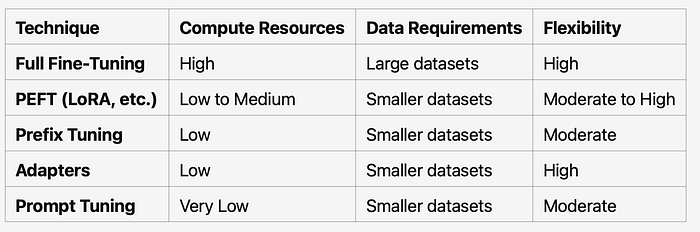
2.3 Comparison of Fine-Tuning Techniques
3. Optimizing Fine-Tuning for Performance 🚀
Fine-tuning can be resource-intensive. Here are some optimization techniques to make it more efficient:
3.1 Batch Size and Learning Rate Adjustment 🎚️
Adjust batch sizes and learning rates for quicker convergence and efficient GPU memory usage.
Example Code: Adjusting Training Parameters
training_args = TrainingArguments(
    output_dir="./results",
    per_device_train_batch_size=8, # Larger batch size
    learning_rate=2e-5, # Lower learning rate for fine-tuning
    num_train_epochs=2,
)Explanation: By fine-tuning the batch size and learning rate, you can optimize the training for quicker and more stable convergence.
3.2 Mixed Precision Training 🏎️
Mixed precision uses both 16-bit and 32-bit floating points to reduce memory usage and accelerate training.
Example Code: Mixed Precision Setup
training_args = TrainingArguments(
    output_dir="./results",
    fp16=True, # Enable mixed precision
)Explanation: Enabling fp16=True activates mixed precision, which can significantly speed up training without sacrificing accuracy.
3.3 Distributed Training for Large Datasets 🌐
Distributed training splits the dataset across multiple GPUs, speeding up the training process for large models and datasets.
Example Code: Distributed Training
training_args = TrainingArguments(
    output_dir="./results",
    per_device_train_batch_size=2,
    num_train_epochs=3,
    deepspeed="./deepspeed_config.json", # Specify DeepSpeed configuration
)Explanation: By setting up distributed training using DeepSpeed or other frameworks, you can use multiple GPUs, allowing for more efficient handling of large datasets.
4. Evaluating Fine-Tuned Models 🧪
After fine-tuning, it’s essential to evaluate the model’s performance to ensure it meets your specific needs. Here are some methods:
4.1 Accuracy Metrics 📊
Common evaluation metrics include:
- BLEU: For evaluating the accuracy of generated text against reference text.
- ROUGE: For assessing recall-oriented text quality, useful in summarization.
Example Code: Evaluating with ROUGE
from datasets import load_metric
metric = load_metric("rouge")
predictions = ["Generated text..."]
references = ["Reference text..."]
results = metric.compute(predictions=predictions, references=references)
print(results)Explanation: This code calculates ROUGE scores, useful for evaluating the effectiveness of fine-tuned summarization models.
4.2 Qualitative Evaluation 👥
Perform human evaluations to gauge the model’s relevance, tone, and overall suitability for specific tasks.
5. Practical Use Cases for Fine-Tuning 💡
Here are some real-world applications where fine-tuning can make a significant difference:
-
Customer Support: Fine-tune models to handle customer queries in a specific tone and style, with high accuracy.
-
Medical Assistance: Train the model on medical terminology to improve accuracy in clinical or diagnostic contexts.
-
Content Generation: Customize models for brand-specific language, tone, and vocabulary for marketing or content creation.
Recap: 🎛️ Fine-Tuning LLMs for Precision: Unlocking the Full Potential of AI 🤖🎯
In this chapter, we explored fine-tuning as a powerful way to customize large language models for specialized tasks. We covered several techniques like Full Fine-Tuning and Parameter-Efficient Fine-Tuning (PEFT) methods such as LoRA, Prefix Tuning, Adapters, and Prompt Tuning, each tailored to different needs for precision and efficiency. Fine-tuning enables your model to respond with relevance, accuracy, and personality suited to specific domains, whether it’s customer support, healthcare, or creative content.
Think of it like honing a chef’s skills to master a regional dish 🍜 — you’re refining the model to excel at particular tasks with finesse and detail. By optimizing parameters and using techniques like mixed precision and distributed training, you can balance performance and computational efficiency. 🎩✨
This concludes our journey in building and refining advanced AI solutions! With Modular RAG and fine-tuning techniques in your toolkit, you’re equipped to create truly innovative AI-driven solutions. 🚀